Contents
Developing first JSP
Introduction to JSP Tags
Accessing Database from JSP
Implementing a Database Application with JSP
Developing first JSP
Introduction to JSP Tags
Accessing Database from JSP
Implementing a Database Application with JSP
Java Server Pages or JSP for short is Sun's solution for developing dynamic web sites. JSP provide excellent server side scripting support for creating database driven web applications. JSP enable the developers to directly insert java code into jsp file, this makes the development process very simple and its maintenance also becomes very easy. JSP pages are efficient, it loads into the web servers memory on receiving the request very first time and the subsequent calls are served within a very short period of time.
In today's environment most web sites servers dynamic pages based on user request. Database is very convenient way to store the data of users and other things. JDBC provide excellent database connectivity in heterogeneous database environment. Using JSP and JDBC its very easy to develop database driven web application.
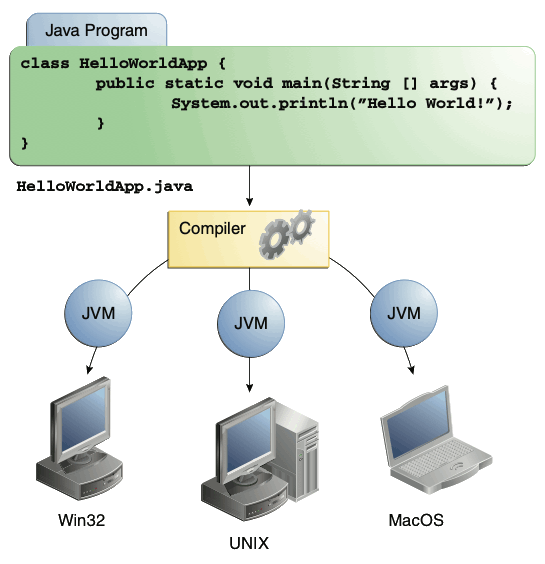
Java is known for its characteristic of "write once, run anywhere." JSP pages are platform independent. Your port your .jsp pages to any platform.
Java Server Pages are save with .jsp extension. Following code which generates a simple html page.
<html>
<head>
<title>First JSP page.</title>
</head>
<body>
<p align="center"><font color="#FF0000" size="6"><%="Java Developers Paradise"%></font></p>
<p align="center"><font color="#800000" size="6"><%="Hello JSP"%> </font></p>
</body>
</html>
In jsp java codes are written between '<%' and '%>' tags. So it takes the following form :<%= Some Expression %> In this example we have use
<%="Java Developers Paradise"%>
<head>
<title>First JSP page.</title>
</head>
<body>
<p align="center"><font color="#FF0000" size="6"><%="Java Developers Paradise"%></font></p>
<p align="center"><font color="#800000" size="6"><%="Hello JSP"%> </font></p>
</body>
</html>
In jsp java codes are written between '<%' and '%>' tags. So it takes the following form :<%= Some Expression %> In this example we have use
<%="Java Developers Paradise"%>
INTRODUCTION TO JSP TAGS
In this lesson we will learn about the various tags available in JSP with suitable examples. In JSP tags can be devided into 4 different types. These are:
1. Directives
In the directives we can import packages, define error handling pages or the session information of the JSP page.
- Declarations
This tag is used for defining the functions and variables to be used in the JSP.
- Scriplets
In this tag we can insert any amount of valid java code and these codes are placed in _jspService method by the JSP engine.
- Expressions
We can use this tag to output any data on the generated page. These data are automatically converted to string and printed on the output stream.
Now we will examine each tags in details with examples.
DIRECTIVES
Syntax of JSP directives is:
<%@directive attribute="value" %>
Where directive may be:
- page: page is used to provide the information about it.
Example: <%@page language="java" %>
Example: <%@ include file="/header.jsp" %>
Introduction to JSP Declaratives
Syntax of JSP Declaratives are:
<%!
//java codes
%>
//java codes
%>
JSP Declaratives begins with <%! and ends %> with .We can embed any amount of java code in the JSP Declaratives. Variables and functions defined in the declaratives are class level and can be used anywhere in the JSP page.
Example:
<%@page contentType="text/html" %> <html> <body> <%! int cnt=0; private int getCount(){ //increment cnt and return the value cnt++; return cnt; } %> <p>Values of Cnt are:</p> <p><%=getCount()%></p> <p><%=getCount()%></p> <p><%=getCount()%></p> <p><%=getCount()%></p> <p><%=getCount()%></p> <p><%=getCount()%></p> </body> </html> |
The above example prints the value of variable cnt.
Introduction to JSP Scriptlets
Syntax of JSP Scriptles are:
<%
//java codes
%>
//java codes
%>
JSP Scriptlets begins with <% and ends%> .We can embed any amount of java code in the JSP Scriptlets. JSP Engine places these code in the _jspService()method. Variables available to the JSP Scriptlets are:
- request:
request represents the clients request and is a subclass of HttpServletRequest. Use this variable to retrieve the data submitted along the request.
Example:
<%
//java codes
String userName=null;
userName=request.getParameter("userName");
%> - response:
response is subclass of HttpServletResponse.
- session:
session represents the HTTP session object associated with the request.
- out:
out is an object of output stream and is used to send any output to the client.
Other variable available to the scriptlets are pageContext, application,config and exception.
Introduction to JSP Expressions
Syntax of JSP Expressions are:
<%="Any thing" %>
JSP Expressions start with
Syntax of JSP Scriptles are with <%= and ends with %>. Between these this you can put anything and that will converted to the String and that will be displayed.
Example:
<%="Hello World!" %>
Above code will display 'Hello World!'.
<%="Hello World!" %>
Above code will display 'Hello World!'.
JSP date example
Till now you learned about the JSP syntax, now I will show you how to create a simple dynamic JSP page that prints the current date and time. So the following code accomplish this:
<%@page contentType="text/html" import="java.util.*" %> <!-- http://www.roseindia.net/jsp --> <html> <body> <p> </p> <div align="center"> <center> <table border="0" cellpadding="0" cellspacing ="0" width="460" bgcolor="#EEFFCA"> <tr> <td width="100%"><font size="6" color ="#008000"> Date Example</font></td> </tr> <tr> <td width="100%"><b> Current Date and time is: <font color="#FF0000"> <%= new java.util.Date() %> </font></b></td> </tr> </table> </center> </div> </body> </html> |
The heart of this example is Date() function of the java.util package which returns the current data and time.
In the JSP Declaratives
<%@page contentType="text/html" import="java.util.*" %>
we are importing the java.util package and following JSP Expression code
<%= new java.util.Date() %>
prints the current date on the page.
Retrieving the data posted to a JSP file from HTML file
Now I will show you how to retrieve the data posted from a HTML file in a JSP page. Consider an html page that prompts the user to enter his/her name, let's call it getname.htm. Here is the code of the html file:
<html> <head> <title>Enter your name</title> </head> <body> <p> </p> <form method="POST"action="showname.jsp"> <p><font color="#800000" size="5">Enter your name:</font><input type ="text" name="username" size="20"></p> <p><input type="submit" value="Submit"name="B1"></p> </form> </body> </html> |
The target of form is "showname.jsp", which displays the name entered by the user. To retrieve the value entered by the user we uses the
request.getParameter("username");
code.
Here is the code of "showname.jsp" file:
<%@page contentType="text/html" %> <html> <body> <p><font size="6">Welcome : <%=request.getParam eter("username")%></font></p> </body> </html> |
Accessing database from JSP
In This article I am going to discuss the connectivity from MYSQL database with JSP.we take a example of Books database. This database contains a table named books_details. This table contains three fields- id,book_name& author. we starts from very beginning. First we learn how to create tables in MySQl database after that we write a html page for inserting the values in 'books_details' table in database. After submitting values a table will be showed that contains the book name and author name.
Database
The database in example consists of a single table of three columns or fields. The database name is "books" and it contains information about books names & authors.
Table:books_details
The database in example consists of a single table of three columns or fields. The database name is "books" and it contains information about books names & authors.
Table:books_details
ID | Book Name | Author |
1. | Java I/O | Tim Ritchey |
2. | Java & XML,2 Edition | Brett McLaughlin |
3. | Java Swing, 2nd Edition | Dave Wood, Marc Loy, |
Start MYSQL prompt and type this SQL statement & press Enter-
MYSQL>CREATE DATABASE `books` ;
This will create "books" database.
Now we create table a table "books_details" in database "books".
MYSQL>CREATE TABLE `books_details` (
`id` INT( 11 ) NOT NULL AUTO_INCREMENT ,
`book_name` VARCHAR( 100 ) NOT NULL ,
`author` VARCHAR( 100 ) NOT NULL ,
PRIMARY KEY ( `id` )
) TYPE = MYISAM ;
This will create a table "books_details" in database "books"
Now we create table a table "books_details" in database "books".
MYSQL>CREATE TABLE `books_details` (
`id` INT( 11 ) NOT NULL AUTO_INCREMENT ,
`book_name` VARCHAR( 100 ) NOT NULL ,
`author` VARCHAR( 100 ) NOT NULL ,
PRIMARY KEY ( `id` )
) TYPE = MYISAM ;
This will create a table "books_details" in database "books"
JSP Code
The following code contains html for user interface & the JSP backend-
<%@ page language="java" import="java.sql.*" %> <% String driver = "org.gjt.mm.mysql.Driver"; Class.forName(driver).newInstance(); Connection con=null; ResultSet rst=null; Statement stmt=null; try{ String url="jdbc:mysql://localhost/books?user= <user>&password=<password>"; con=DriverManager.getConnection(url); stmt=con.createStatement(); } catch(Exception e){ System.out.println(e.getMessage()); } if(request.getParameter("action") != null){ String bookname=request.getParameter("bookname"); String author=request.getParameter("author"); stmt.executeUpdate("insert into books_details(book_name, author) values('"+bookname+"','"+author+"')"); rst=stmt.executeQuery("select * from books_details"); %> <html> <body> <center> <h2>Books List</h2> <table border="1" cellspacing="0" cellpadding ="0"> <tr> <td><b>S.No</b></td> <td><b>Book Name</b></td> <td><b>Author</.b></td> </tr> <% int no=1; while(rst.next()){ %> <tr> <td><%=no%></td> <td><%=rst.getString(" book_name")%></td> <td> <%=rst.getString("author") %> </td> </tr> <% no++; } rst.close(); stmt.close(); con.close(); %> </table> </center> </body> </html> <%}else{%> <html> <head> <title>Book Entry FormDocument</title> <script language="javascript"> function validate(objForm){ if(objForm.bookname.value.length==0){ alert("Please enter Book Name!"); objForm.bookname.focus(); return false; } if(objForm.author.value.length==0){ alert("Please enter Author name!"); objForm.author.focus(); return false; } return true; } </script> </head> <body> <center> <form action="BookEntryForm.jsp" method="post" name="entry" onSubmit="return validate(this)"> <input type="hidden" value="list" name="action"> <table border="1" cellpadding="0" cellspacing="0"> <tr> <td> <table> <tr> <td colspan="2" align="center"> <h2>Book Entry Form</h2></td> </tr> <tr> <td colspan="2"> </td> </tr> <tr> <td>Book Name:</td> <td><input name="bookname" type= "text" size="50"></td> </tr> <tr> <td>Author:</td><td><input name= "author" type="text" size="50"></td> </tr> <tr> <td colspan="2" align="center"> <input type="submit" value="Submit"></td> </tr> </table> </td> </tr> </table> </form> </center> </body> </html> <%}%> |
Now we explain the above codes.
Declaring Variables: Java is a strongly typed language which means, that variables must be explicitly declared before use and must be declared with the correct data types. In the above example code we declare some variables for making connection. Theses variables are-
Connection con=null;
ResultSet rst=null;
Statement stmt=null;
The objects of type Connection, ResultSet and Statement are associated with the Java sql. "con" is a Connection type object variable that will hold Connection type object. "rst" is a ResultSet type object variable that will hold a result set returned by a database query. "stmt" is a object variable of Statement .Statement Class methods allow to execute any query.
ResultSet rst=null;
Statement stmt=null;
The objects of type Connection, ResultSet and Statement are associated with the Java sql. "con" is a Connection type object variable that will hold Connection type object. "rst" is a ResultSet type object variable that will hold a result set returned by a database query. "stmt" is a object variable of Statement .Statement Class methods allow to execute any query.
Connection to database: The first task of this programmer is to load database driver. This is achieved using the single line of code :-
String driver = "org.gjt.mm.mysql.Driver";
Class.forName(driver).newInstance();
The next task is to make a connection. This is done using the single line of code :-
String url="jdbc:mysql://localhost/books?user=<userName>&password=<password>";
con=DriverManager.getConnection(url);
When url is passed into getConnection() method of DriverManager class it returns connection object.
Executing Query or Accessing data from database:
This is done using following code :-
stmt=con.createStatement(); //create a Statement object
rst=stmt.executeQuery("select * from books_details");
stmt=con.createStatement(); //create a Statement object
rst=stmt.executeQuery("select * from books_details");
stmt is the Statement type variable name and rst is the RecordSet type variable. A query is always executed on a Statement object.
A Statement object is created by calling createStatement() method on connection object con.
The two most important methods of this Statement interface are executeQuery() and executeUpdate(). The executeQuery() method executes an SQL statement that returns a single ResultSet object. The executeUpdate() method executes an insert, update, and delete SQL statement. The method returns the number of records affected by the SQL statement execution.
After creating a Statement ,a method executeQuery() or executeUpdate() is called on Statement object stmt and a SQL query string is passed in method executeQuery() or executeUpdate().
This will return a ResultSet rst related to the query string.
while(rst.next()){
%>
<tr><td><%=no%></td><td><%=rst.getString("book_name")%></td><td><%=rst.getString("author")%></td></tr>
<%
}
%>
<tr><td><%=no%></td><td><%=rst.getString("book_name")%></td><td><%=rst.getString("author")%></td></tr>
<%
}
The ResultSet represents a table-like database result set. A ResultSet object maintains a cursor pointing to its current row of data. Initially, the cursor is positioned before the first row. Therefore, to access the first row in the ResultSet, you use the next()method. This method moves the cursor to the next record and returns true if the next row is valid, and false if there are no more records in the ResultSet object.
Other important methods are getXXX() methods, where XXX is the data type returned by the method at the specified index, including String, long, and int. The indexing used is 1-based. For example, to obtain the second column of type String, you use the following code:
resultSet.getString(2);
You can also use the getXXX() methods that accept a column name instead of a column index. For instance, the following code retrieves the value of the column LastName of type String.
resultSet.getString("book_name");
The above example shows how you can use the next() method as well as the getString() method. Here you retrieve the 'book_name' and 'author' columns from a table called 'books_details'. You then iterate through the returned ResultSet and print all the book name and author name in the format " book name | author " to the web page.
Summary:
This article presents JDBC and shows how you can manipulate data in a relational database from your JSP page. To do this, you need to use the java.sql package: DriverManager, Connection, Statement, and ResultSet. Keep in mind, however, that this is only an introduction. To create a Web application, you need JDBC to use more features such as prepared statements and connection pooling.
When you click on the above link a Book Entry Form will open
Fill the book name and author fields and press Submit button. A page will open and show a table of book name and authors like...
Implementing a Database Application with JSP
In this section we are going to implement insert data, delete data, and update data using with JDBC database and also using of JavaScript.
Step 1: Create employee form (EmployeeInformation.jsp) .
In this step first of all create Employee information form and retrieved employee id from database using with JDBC database.
Here is the code EmployeeInformation.jsp
<%@ page language="java" import="java.lang.*" import="java.sql.*" %> <html> <body border="1" bgcolor="pink" width="650"> <% Connection con = null; String url = "jdbc:mysql://192.168.10.211:3306/"; String db = "amar"; String driver = "com.mysql.jdbc.Driver"; String userName ="amar"; String password="amar123"; Class.forName(driver); con = DriverManager.getConnection(url+db,userName,password); Statement stmt=null; %> <form method="GET" ACTION="ProcessAction.jsp"> <h3> <P ALIGN="CENTER"> <FONT SIZE=5> EMPLOYEE INFORMATION </FONT> </P> </h3> </br> </br> <br> <br> <table callspacing=5 cellpadding=5 bgcolor="lightblue" colspan=2 rowspan=2 align="center"> <tr> <td> <font size=5> Enter Employee ID </td> <td> <input type="TEXT" ID="id" name="empid"> </font> <select name="empIds" onchange="document.getElementById('id').value=this.options[this.selectedIndex].text"> <option>Select One</option> <% String rec="SELECT empid,empname FROM Employee ORDER BY empid"; try { stmt=con.createStatement(); ResultSet rs=stmt.executeQuery(rec); while(rs.next()) { %> <option><%= rs.getInt(1)%></option> <%} } catch(Exception e){ System.out.println(e); } %> </select> </font> </td> </tr> <tr> <td> <font size=5> Enter Employee Name </td> <td><input type="text" name="empname"> </font> </td> </tr> <tr> <font size=5> <B> <td><input type="RADIO" name="r1" VALUE="add" >Insert </td> </tr> <tr> <td><input type="RADIO" name="r1" VALUE="del" >Delete </td> </tr> <tr> <td><input type="RADIO" name="r1" VALUE="mod" >Modify </td> </tr> </font> </b> <tr> <td><input type="SUBMIT" VALUE="Submit"> <input type="RESET" value="Reset"> </TD> </tr> </body> </html> |
Step 2 : Create "ProcessAction.jsp" for Process the Data and forward according to user requirement.
In this step first of all we will create ProcessAction.jsp for getting all string value using withgetParameter() method and forward on different page like JSPInsertAction.jsp, ClearAction.jsp, and update.jsp.
<%@ page language="java" %> <%@ page import="java.lang.*" %> <%@ page import="java.sql.*" %> <% String str=request.getParameter("r1"); String name=request.getParameter("empname"); String code=request.getParameter("empid"); if(str.equals("add")) { %> <jsp:forward page="JSPInsertAction.jsp"/> <% } else if(str.equals("del")) { %> <jsp:forward page="ClearAction.jsp" /> <% } else if(str.equals("mod")) { %> <jsp:forward page="update.jsp" /> <% } else { %> <jsp:forward page="Noresponse.html" /> <% } %> |
Step 3: Create data insert action page ("JSPInsertAction.jsp").
This code using for insert data into database by using JDBC database. When you will select same employee id and employee name then massage will display employee id already exit in database.
<%@ page language="java" import="java.lang.*" import="java.sql.*" %> <HTML> <BODY> <FORM NAME="f1" ACTION="EmplyeeInformation.jsp"> <% Connection con = null; String url = "jdbc:mysql://192.168.10.211:3306/"; String db = "amar"; String driver = "com.mysql.jdbc.Driver"; String userName ="amar"; String password="amar123"; String str=request.getParameter("r1"); String empname=request.getParameter("empname"); String code=request.getParameter("empid"); int ent=0; String failed=""; try{ String click="SELECT COUNT(*) FROM Employee WHERE empid='"+code+"' and empname='"+empname+"'"; Class.forName(driver); con = DriverManager.getConnection(url+db,userName,password); Statement stmt=null; stmt=con.createStatement(); ResultSet ok = stmt.executeQuery(click); while(ok.next()) { ent=ok.getInt(1); } if(ent==0) { String insertQry = "insert Employee values('"+code+"','"+empname+"')"; int val = stmt.executeUpdate(insertQry); %> <script language="javascript"> alert("Insertion successful"); document.location="EmplyeeInformation.jsp"; </script> <% } if(ent==1) { %> <script language="javascript"> alert("This Emp ID already Exists"); document.location="EmplyeeInformation.jsp"; </script> <% } stmt.close(); con.close(); } catch(Exception e) { out.println(e.toString()); } %> </FORM> </BODY> </HTML> |
Step 4: Create data deletion code from database ("ClearAction.jsp").
In this step you will learn how to delete data from database. When, you will select employee id and employee name then select delete radio button after selecting delete radio button when you will click on submit button then data will successfully delete from database.
<%@ page language="java" import="java.lang.*" import="java.sql.*" %> <% Connection con = null; String url = "jdbc:mysql://192.168.10.211:3306/"; String db = "amar"; String driver = "com.mysql.jdbc.Driver"; String userName ="amar"; String password="amar123"; String str=request.getParameter("r1"); String name=request.getParameter("empname"); String code=request.getParameter("empid"); int EmpID=Integer.parseInt(code); try { Class.forName(driver); con = DriverManager.getConnection(url+db,userName,password); String sql = "delete from Employee where empid= ?"; PreparedStatement stmt=null; stmt=con.prepareStatement(sql); stmt.setInt(1,EmpID); int erase=stmt.executeUpdate(); if(erase==0) { %> <script language="javascript"> alert("Deletion successful"); </script> <% } if(erase==1) { %> <script language="javascript"> alert("Deletion successful"); </script> <% } stmt.close(); con.close(); out.println("Data delete successfully from database."); } catch(Exception e) { out.println(e); } %> |
Step 5: Create update data code ("update.jsp").
In this step you will learn, how to modify data in database by using JDBC database.
<%@ page language="java" import="java.lang.*" import="java.sql.*" %> <HTML> <BODY> <% Connection con = null; String url = "jdbc:mysql://192.168.10.211:3306/"; String db = "amar"; String driver = "com.mysql.jdbc.Driver"; String userName ="amar"; String password="amar123"; String rep=request.getParameter("empname"); String code=(String)request.getParameter("empid"); int ID=Integer.parseInt(code); try { Class.forName(driver); con = DriverManager.getConnection(url+db,userName,password); String rec="UPDATE Employee SET empname='"+rep+"' where empid='"+ID+"'"; Statement stmt=null; stmt=con.createStatement(); int mod=stmt.executeUpdate(rec); if(mod==0) { %> <script language="javascript"> alert("This Emp ID already Exists"); </script> <% } if(mod==1) { %> <script language="javascript"> alert("Record Updated Successfully"); </script> <% } con.commit(); stmt.close(); con.close(); } catch(Exception e) { %> <script language="javascript"> alert("Please Enter New Name"); document.location="EmplyeeInformation.jsp"; </script> <% } %> </BODY> </HTML> |
Here is the output of this program:
When you will enter new employee id and employee name and select insert button after selecting insert button click on submit button then data will insert successfully in database.
If you will select same employee id then massage will display like this.
If you want to modify record then select employee id and enter new employee name. When you will select modify radio button then click on submit button then massage will display like this.